Fishing Times Pro
FishingreminderSports
4.8200.00 Reviews
- Version
- 9.2-pro
- Installs
- 10.00K
- Age Rating
- Everyone
Screenshots
Our Review of Fishing Times Pro
 Analysis by Appyee
Before I leave for a fishing spot, I like to settle one question first: am I planning around a short, promising window or simply spending the day outside? Fishing Times Pro is most useful for the first kind of trip. It brings solunar timing into the planning process, alongside practical tools for checking conditions and keeping notes. I wouldn’t treat any prediction as a promise of a catch, but I can see the appeal of having a repeatable way to choose when to go and to learn from each outing.
A useful routine starts before the drive
My best approach is to check the app while I still have time to change plans, rather than opening it only after I reach the water. I can look at the fishing periods, consider the weather, and decide whether a brief visit fits my day. That turns the forecast into a planning aid instead of a reason to keep checking my phone from the bank.
For a familiar location, I would pair the predicted periods with what I already know about access, daylight, and the kind of fishing I intend to do. If a suggested window falls at an inconvenient time, I would not automatically rearrange everything around it. The timing is one input; practical conditions and personal experience still matter more than a neat-looking forecast.
What the solunar forecast can and cannot tell you
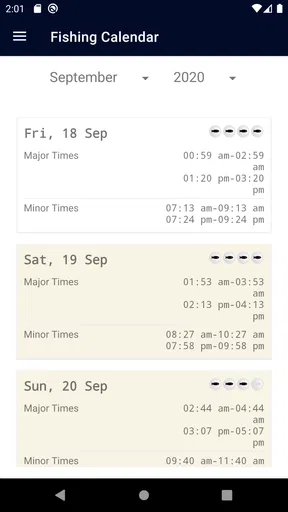
The central idea is straightforward: solunar tables use the positions of the moon and sun to identify periods that may be favorable for fish activity. That gives me a consistent reference point for choosing a start time or comparing outings. It does not tell me which bait to use, where fish are holding, or whether local conditions will cooperate, so I see it as a prompt for planning rather than a substitute for judgment.
A useful habit is to note the predicted period before fishing, then record what actually happened afterward. If the forecast and your results do not line up every time, that is normal. Over several trips, a log can help you decide whether the timing is useful for your own waters and habits. I would avoid drawing a conclusion from one memorable catch or one quiet session; fishing has too many moving parts for that.
Weather checks belong in the same decision
The app also includes weather information, including wind speed and direction. I would check those details before leaving, especially when choosing between an exposed bank and a more sheltered place. Wind can affect comfort and casting, and a forecast that looks fine at a glance may still make a particular spot unpleasant.
I would still use a dedicated weather source when the forecast matters for safety or a fast-changing situation. A fishing app is convenient for bringing trip-planning details together, but it should not be the only basis for deciding whether conditions are safe. That distinction is important: convenience helps with routine choices, while current local weather deserves attention of its own.
Keep useful records, not a diary for its own sake
The personal log can make repeat visits more informative. I would record details that help answer a real question later: what I caught, which bait I used, and the conditions on the day. A short, consistent note is more valuable than a long entry I will never compare. If a particular approach seems to work, the record gives me a way to check whether it was a pattern or just a lucky session.
There is a small trade-off here. Logging takes attention away from the outing, so I would keep it brief and do it when there is a natural pause rather than documenting every cast. The app is better as a memory aid than as a demand to turn a relaxing hobby into a data project. If you enjoy spotting patterns, this part may become more valuable with time; if you prefer fishing without keeping records, it is easy to focus on the timing and location tools instead.
Save locations with care and make them reusable
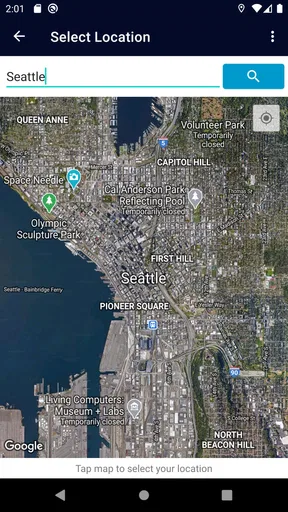
The GPS map lets me mark fishing spots for later, which is handy when a location is easy to miss or when I want to return under different conditions. I would label or remember saved places in a way that distinguishes them clearly in my own routine—for example, by noting which one is easiest to reach or better suited to a windy day. The practical benefit is not just finding a pin again; it is making a future trip easier to plan.
Saved coordinates are not a replacement for checking access or respecting local rules. A point on a map does not guarantee that a bank is reachable, open, or appropriate to fish. I would treat it as a personal navigation aid and verify the real-world details before setting out, particularly when visiting somewhere unfamiliar.
Simple shortcuts for repeat trips
For a regular weekend outing, I would use a small routine: check the time window and weather before departure, choose a saved spot that suits those conditions, then add a compact log entry afterward. That sequence keeps the app useful without making it the main event. It also makes comparisons fairer, because I am less likely to forget whether a slow day came with awkward wind, a different bait, or a different time of arrival.
Another helpful approach is to compare similar outings rather than treating every trip as a direct test of the solunar forecast. A short visit to one familiar spot can be compared with another visit there under broadly similar conditions. Even then, the comparison is imperfect, but it is more informative than matching a forecast to an unrelated trip at a different place.
Who will get the most from it
I think the app suits anglers who enjoy planning, revisit a handful of locations, or want a simple record of what they tried. A casual angler can use it to pick a convenient time and check conditions without needing to become an expert in solunar tables. More experienced users may get extra value by treating the forecast, saved locations, and catch notes as parts of one personal routine rather than isolated features.
It is less compelling for someone who wants a live community, detailed species guidance, or a full navigation and safety toolkit in one place. It also may not change much for anglers who always fish at the same time because of work or family commitments. In that case, the log and saved spots could still be handy, but the timing forecasts may not affect the decision to go.
Where it sits among fishing tools
Compared with checking a general weather app and making a mental note of the moon, this app offers a fishing-centered view that can make planning feel more organized. Compared with a paper notebook, it brings saved locations and digital records together with timing information. Those conveniences are useful, but they do not make it a replacement for local knowledge, specialist forecasts, or a dedicated navigation tool when those are what a trip requires.
I would not expect a solunar calendar to outperform experience on its own. If you already know a waterway’s habits, the app is best used to support your decisions, not overrule them. If you are new to fishing, it can give you a structure for planning, but it cannot teach technique or identify the best place to cast. That balance is the key to getting sensible value from it.
Cost, compatibility, and a practical decision
This is a paid sports app from Fishingreminder, priced at $3.99, and its current version is 9.2-pro. It has a 4.8 average from around 1.9 thousand ratings, with over 10 thousand installs. It is rated for Everyone and dates back to February 18, 2012; the stated minimum operating system is 5.1. Those details make it worth checking compatibility on your device before buying, particularly if you use an older phone.
The price makes most sense if you will use more than one part of the app: checking predicted periods, saving places, and keeping a record. If all you need is a quick weather check, a general weather app may be enough. If you fish often and like to compare trips, paying for a focused tool may feel more worthwhile than juggling scattered notes and separate checks.
In an everyday situation, I might have a free morning, check the conditions before breakfast, and choose between a familiar nearby spot and a longer drive. I could use the timing information as one consideration, avoid a location that seems poorly suited to the wind, and save the trip details afterward. If the outing is quiet, the log still makes it easier to remember what I tried; if it goes well, I have a useful starting point for the next visit.
One question anglers often have is whether they need a connection at the water. The app can work offline when the relevant data has been loaded beforehand, so I would prepare before leaving a reliable connection. That does not mean every piece of information will refresh without internet access, so the sensible habit is to check what you need in advance rather than assume an offline phone will provide current conditions.
Another fair question is whether the predicted fishing windows guarantee better results. They do not. I would use them to narrow down a possible time, then weigh weather, access, and what I have learned about the location. The same applies to the app’s tools generally: they help organize a trip, but the quality of the decision still depends on the angler.
There is also the question of whether it is useful for occasional fishing. It can be, especially if you want an easy way to choose a time or remember a place, but frequent users are more likely to build a meaningful history from the log. If you only fish once in a while and already have a reliable routine, the paid purchase may be harder to justify. I would decide based on whether the combination of planning and record-keeping solves a problem you actually have.
Getting Hooked: First Impressions
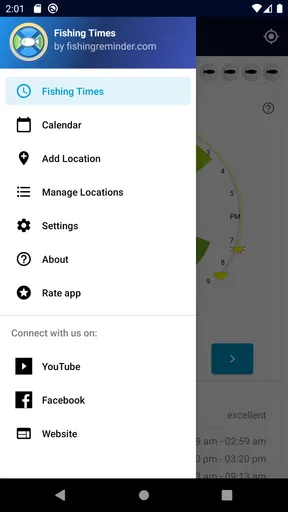
When you first open Fishing Times Pro, you’re greeted with a clean, intuitive interface. No clutter, no fuss, just you and your fishing data. It’s like the app knows you’re here to get straight to business. The design is straightforward, making it easy even for those who aren’t exactly tech-savvy. Believe me, you don’t have to be a smartphone wizard to navigate this app.
Features That Reel You In
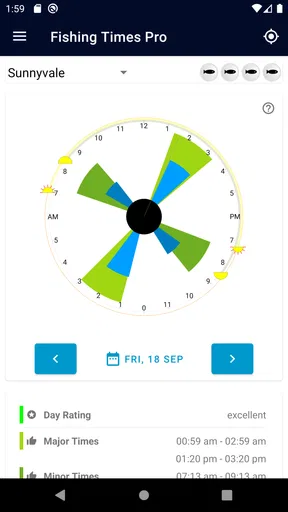
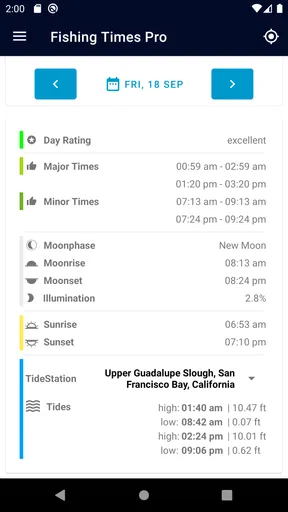
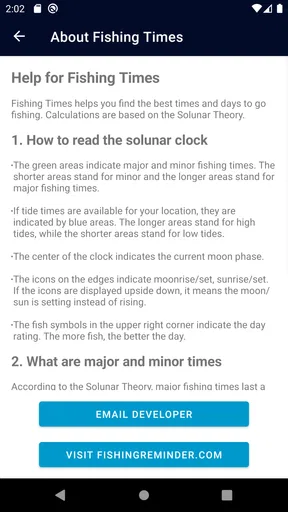
This app is all about helping you find the best times to fish. It uses solunar tables, which are based on the position of the moon and sun, to predict the most promising fishing times. I’ve tested it out a few times, and it’s surprisingly accurate. Of course, fishing is never a guaranteed sport, but these predictions give you a better shot at success.
Another cool feature is the weather forecast integration. It’s like having your personal meteorologist. You can check out the weather conditions for your favorite fishing spots, and it even gives you wind speed and direction. No more getting caught in a surprise storm!
Diving Deeper: The Details
One of my favorite things about Fishing Times Pro is the ability to create a personal log. You can keep track of your catches, the bait you used, and the conditions of the day. It’s like having a digital fishing diary! This is super handy if you’re looking to improve your skills or just want to keep a record of your fishing adventures.
And let’s not forget the GPS feature. You can mark your fishing spots on the map, and the app will store them for future trips. It’s perfect for those hidden gems you stumble upon that you don’t want to forget.
Cast Your Line: How It Performs
Performance-wise, the app runs smoothly without any annoying lags. It’s quick to load and doesn’t drain your battery, which is a relief when you’re out in the wild. The app’s lightweight nature means it won’t take up a ton of space on your phone, leaving you more room for those fishing photos.
Not to mention, the app supports both Android and iOS, so no one’s left out of the fun. And if you’re worried about being off the grid, it works well offline too, as long as you’ve got your data pre-loaded.
The Final Catch
So, should you download Fishing Times Pro? If you’re serious about fishing or even just a weekend angler, this app is a game-changer. It’s packed with useful features that are easy to access and understand. Plus, it adds a touch of excitement and strategy to your fishing trips. I’d say give it a shot; you might just find it’s the secret weapon you’ve been searching for.
In a world where tech is becoming a bigger part of outdoor activities, Fishing Times Pro strikes a perfect balance. It enhances the fishing experience without taking away from the peace and tranquility that fishing brings. So grab your gear, download the app, and get ready for your next adventure by the water!
Verdict
Strengths of Fishing Times Pro
- Accurate fish activity forecasts.
- User-friendly interface.
- Customizable notifications.
- Offline maps available.
- Weather integration included.
Limitations of Fishing Times Pro
- Limited free features.
- Occasional app crashes.
- Subscription required for full access.
- No social sharing options.
- Limited language support.
Similar Picks in This Category
View All
BeSoccer: Soccer Live Score
BeSoccer apps4.3

Cricbuzz - Live Cricket Scores
Cricbuzz.com3.7

NFL
NFL Enterprises LLC2.4

Da Fit
MO YOUNG LIMITED3.6

ESPN
Disney4.5

LiveScore: Live Sports Scores
LiveScore Limited4.5
Frequently Asked Questions
What is Fishing Times Pro?
Fishing Times Pro is a mobile application designed to help anglers optimize their fishing trips. It provides users with solunar forecasts, which indicate the best times to fish based on lunar phases and solar activity. The app also offers weather forecasts, tide charts, and other valuable insights tailored for fishing enthusiasts.
How does Fishing Times Pro determine the best fishing times?
Fishing Times Pro uses solunar theory to predict optimal fishing times. This involves analyzing lunar phases and solar activity to determine when fish are most likely to be active. The app combines these predictions with local weather data and tide charts, giving a comprehensive overview of the best times to fish at your location.
Is Fishing Times Pro available for both Android and iOS devices?
Yes, Fishing Times Pro is available for download on both Android and iOS platforms. Users can find the app on Google Play Store for Android devices and the Apple App Store for iOS devices. This ensures that all users, regardless of their device, can access the app’s features and improve their fishing experience.
Does Fishing Times Pro require an internet connection to function?
Fishing Times Pro does require an internet connection to update weather forecasts, tide charts, and other dynamic data. However, once the data is downloaded, you can access certain features offline. For the most accurate and up-to-date information, it's recommended to connect to the internet before heading out on your fishing trip.
Are there any additional costs or in-app purchases in Fishing Times Pro?
Fishing Times Pro may offer in-app purchases or a subscription model to unlock premium features. These could include advanced forecasting tools, ad-free experience, and additional data sets. It’s advisable to review the app’s pricing details on the respective app store to understand any additional costs involved.
